
If you're a founder or ops leader looking at accounts payable right now, the symptoms are usually obvious. Invoices sit in inboxes. Approvals depend on someone remembering to forward a PDF. Finance spends time chasing missing PO details instead of managing cash with confidence. Nothing is fully broken, but the process doesn't scale.
That is why AI automation for accounts payable matters. Not because AI is fashionable, but because AP is one of the clearest places to turn repetitive finance work into a controlled, measurable operating system. The companies that get value from it don't start with tool demos. They start by asking a harder question: what in our process is ready to automate, and what would success look like in the first quarter after launch?
The Hidden Costs of Manual Accounts Payable
Manual AP rarely fails in a dramatic way. It leaks value in small, repeated ways. A supplier sends an invoice as a PDF attachment. Someone downloads it, renames it, keys the fields into the ERP, routes it for approval, follows up when the approver is slow, then rechecks the invoice before payment. One invoice isn't the problem. The pile is.
For a founder, the full cost isn't just clerical time. It's delayed visibility, inconsistent controls, and a finance team stuck doing transaction handling when they should be protecting margin and forecasting cash. Manual AP also creates a fragile process. If one experienced team member leaves, the undocumented workarounds leave with them.
Where the drag actually shows up
The operational pain usually appears in four places:
- Approval delays: Invoices wait in email threads or chat messages because routing isn't structured.
- Rework: AP staff re-enter data, correct coding, and resolve avoidable mismatches.
- Supplier friction: Vendors ask for status updates because nobody can answer quickly.
- Weak visibility: Leaders don't get a clean view of liabilities until late in the cycle.
This is why AI adoption in AP has become a business decision, not a niche experiment. Approximately 75% of accounts payable departments worldwide currently use some form of automation and AI tooling, and 24% of organizations have already implemented fully automated invoicing technologies, processing an average of 32.6% of all invoices without human intervention, according to Tungsten Automation's AP metrics summary.
Practical rule: If your AP team still depends on inbox triage, spreadsheet trackers, and tribal knowledge, you don't have an invoice process. You have a queue of exceptions waiting to happen.
Why founders should care early
Founders often postpone AP automation because it feels back-office. That's a mistake. AP touches supplier relationships, purchasing discipline, audit readiness, and cash planning. If the process stays manual while invoice volume grows, finance either adds headcount to hold the line or accepts slower control loops.
Neither option is attractive.
The better move is to treat AI automation for accounts payable like any other scaling project. Audit the current workflow. Find the repeatable work. Define the control points that must stay human. Then automate in phases.
What AI-Powered AP Automation Really Means
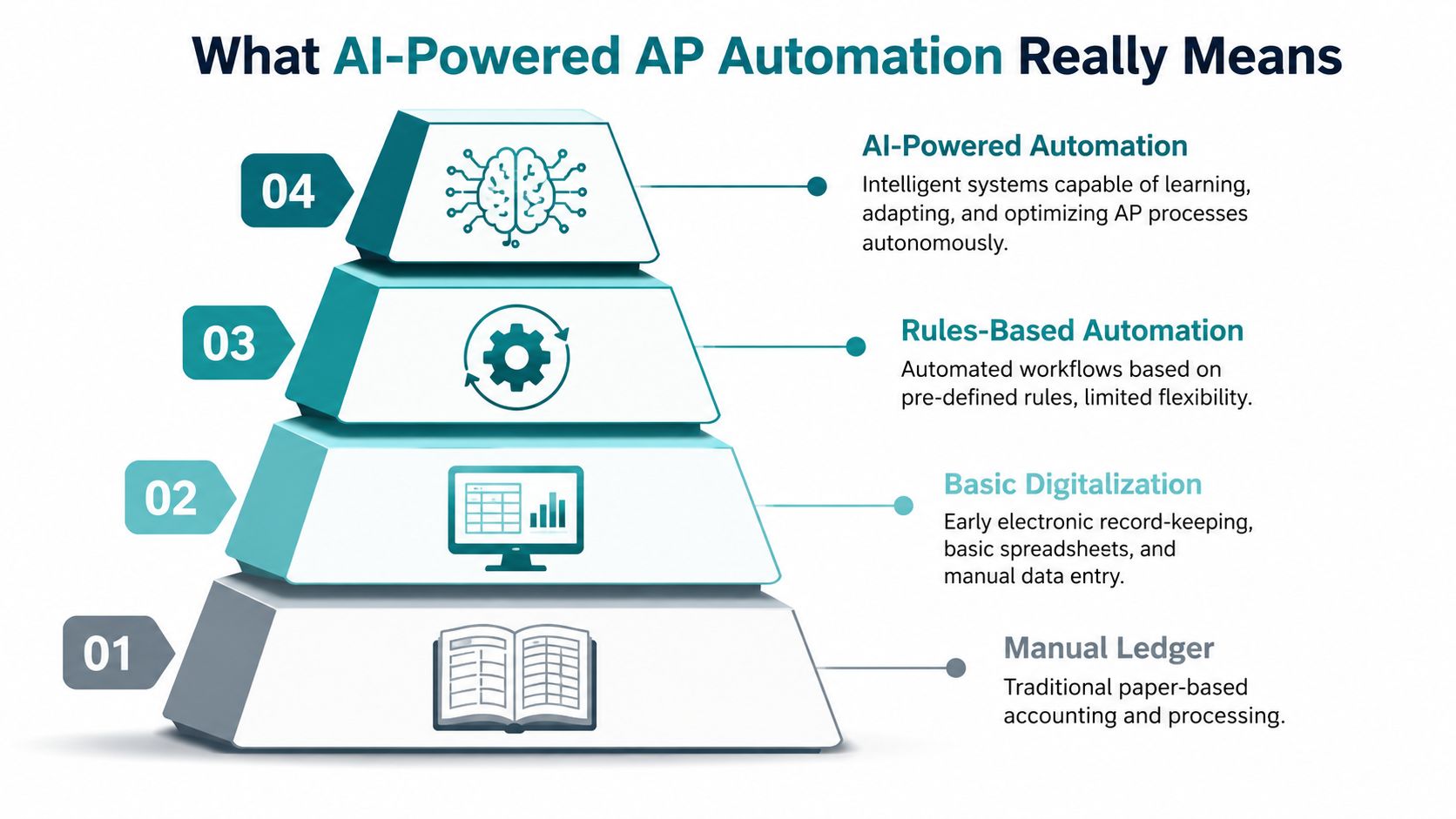
Often, AP automation is considered to mean scanning invoices and pushing them into a queue. That's only the first layer. Real AI-powered AP automation is closer to upgrading from a filing cabinet to an intelligent financial co-pilot. It doesn't just store documents. It interprets them, validates them, routes them, and learns from the patterns in your process.
Old automation vs modern AI
Basic automation follows fixed rules. If invoice format A arrives, send it to person B. If the PO number is missing, flag it. That helps, but it doesn't solve the deeper problem. It digitizes a manual process without making the process much smarter.
AI changes the job in three ways:
| Approach | What it does | Where it breaks |
|---|---|---|
| Manual processing | Humans read, key, route, and verify invoices | Slow, inconsistent, hard to scale |
| Basic digitalization | Stores invoices electronically and tracks them in systems | Still relies on manual review and data entry |
| Rules-based automation | Applies predefined logic for routing and matching | Struggles with document variation and exceptions |
| AI-powered automation | Understands document context, predicts matches, suggests actions, and improves over time | Depends on clean data, strong governance, and thoughtful rollout |
The distinction matters. A legacy OCR workflow might read text from a page. A modern AI workflow can determine which text matters, connect it to vendor records and purchasing data, and send the invoice down the right path without someone touching every field.
What the system should handle end to end
When founders evaluate AI automation for accounts payable, I suggest thinking in terms of outcomes, not features. A capable system should support most of this chain:
- Invoice ingestion: Pull invoices from email, portals, PDFs, EDI, and related formats.
- Data extraction: Read header fields and line items with context.
- Validation: Check amounts, supplier details, tax logic, and document completeness.
- Matching: Compare the invoice against purchase orders and receipts where available.
- Approval routing: Send the invoice to the right approver based on policy and history.
- Exception handling: Flag mismatches, duplicates, or anomalies for review.
- Status visibility: Show finance, procurement, and stakeholders where each invoice stands.
The best AP systems don't remove people from the loop. They remove people from low-value repetition so they can handle policy, exceptions, and supplier decisions.
What doesn't work
Two approaches usually disappoint.
First, buying an AP platform because the demo looks polished, before cleaning up vendor data and approval rules. Second, expecting generative AI alone to run a transactional workflow. It can help explain, summarize, and communicate. It shouldn't be mistaken for the engine that enforces controls.
That distinction saves a lot of implementation pain later.
The Core AI Components Driving Automation
"AI" in AP isn't one thing. It's a stack of components doing different jobs. Founders don't need to become technical buyers, but they do need to understand what each layer is responsible for. Otherwise it's easy to overpay for features you won't use or underinvest in the ones that make the workflow reliable.
Document intelligence and next-generation OCR
The starting point for most AP automations is simple: turn invoices from PDFs, scans, e-invoices, and related formats into structured data your finance systems can use.
Modern document intelligence does more than text recognition. It identifies invoice number, supplier name, totals, tax fields, dates, and line items in context. It can handle variation in layouts far better than old template-based systems. If you want a deeper view of how invoice extraction works in practice, this guide on invoice OCR with AI is a useful reference.
The technology has matured fast. In 2026, autonomous accounts payable systems utilizing agentic AI achieve header and line-level data capture accuracy of 99% from formats such as e-invoices, EDI, and PDFs, according to Medius on autonomous AP. That matters because extraction quality is upstream of everything else. If the invoice data is wrong at capture, every downstream workflow gets noisier.
Machine learning for matching and anomaly detection
Once the system has the data, machine learning handles the judgment-heavy pattern work. It helps with three-way matching, duplicate detection, approval path suggestions, and spotting invoice records that don't look like normal behavior.
A rules engine can catch exact mismatches. Machine learning can catch patterns that are directionally wrong even when they don't violate a simple rule. That is a major difference in real AP operations, where supplier formats, naming conventions, and purchasing behavior vary over time.
RPA for system execution
Robotic Process Automation is less glamorous, but still useful. Think of RPA as the digital operator that moves data between systems, triggers workflow steps, updates statuses, or pushes approved invoice data into an ERP when an API path is limited or unavailable.
RPA is rarely the intelligence layer. It's the execution layer. In practical terms, it often becomes important in mid-market and enterprise environments where finance teams still rely on older ERP setups.
LLMs and retrieval for communication and analysis
Large language models have a role in AP, but it's narrower than many vendors imply. They are best used for explanation, summarization, natural-language queries, and drafting communications.
Here is where they help:
- Supplier communication: Draft status updates or requests for missing information.
- Finance support: Summarize why an invoice is in exception status.
- Manager visibility: Answer plain-language questions about invoice backlog or approval bottlenecks.
- Audit support: Explain workflow history in readable terms.
Here is where they don't belong by themselves:
- Core transactional control
- Autonomous payment decisions without guardrails
- High-risk exception handling without validated rules and oversight
A good AP architecture uses the right model for the right job. Document AI reads. ML predicts and flags. RPA executes. LLMs explain.
What founders should evaluate first
If you're looking at vendors, don't start by asking who has "the most AI." Ask these questions instead:
- How well does the system capture line-level data from your actual invoice formats?
- How does it handle exceptions, not just happy-path invoices?
- What logic is rules-based, and what logic adapts over time?
- How does it integrate with your ERP or accounting system?
- What remains under human control?
Those answers tell you far more than a feature grid.
Key Benefits and Measurable Business KPIs
The pitch for AI automation for accounts payable is usually framed around efficiency. That undersells it. Its true value comes from changing AP from a transactional bottleneck into a measurable finance function with clear operating metrics.
Cost reduction you can actually model
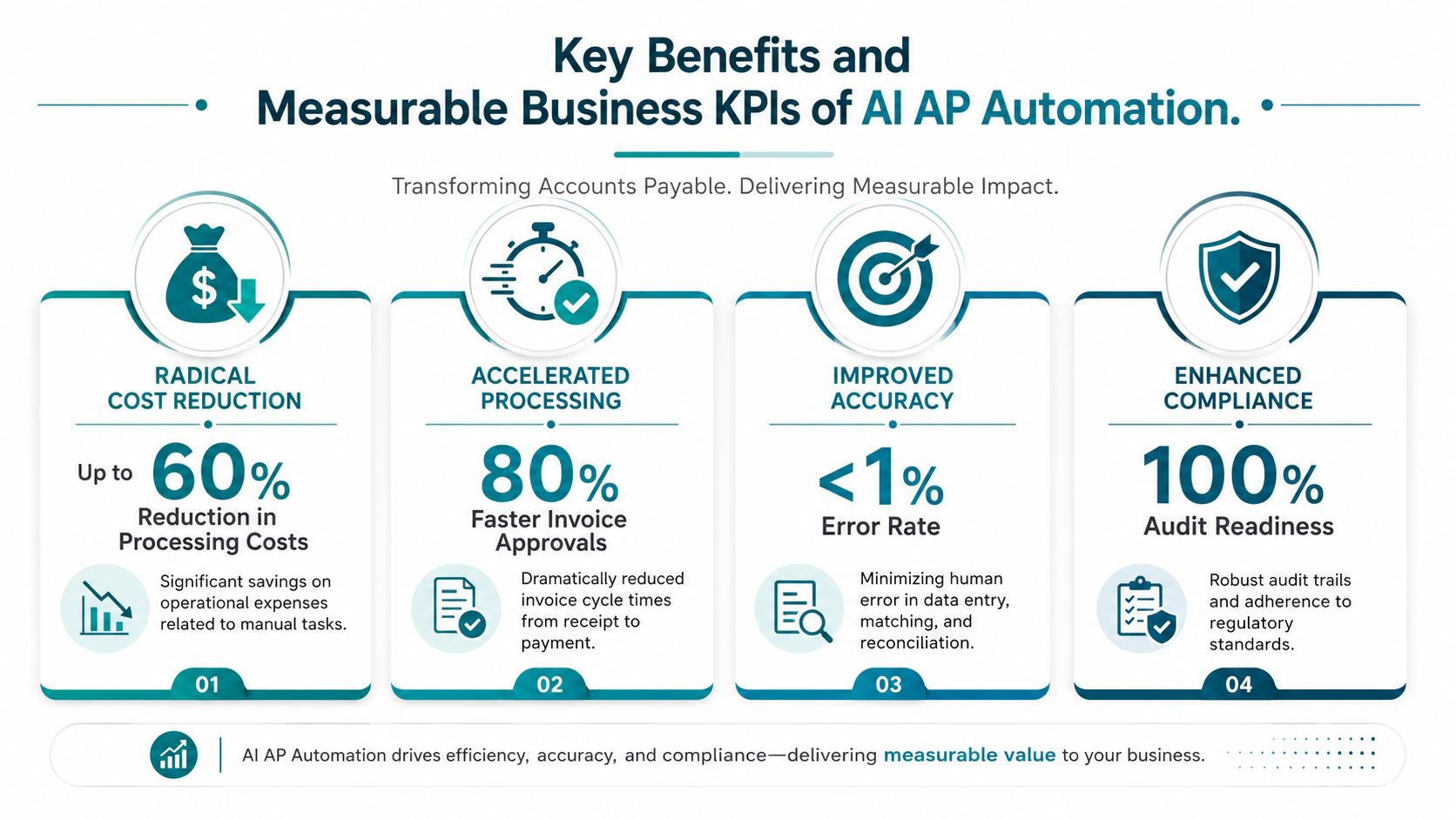
The headline number is hard to ignore. AI-driven accounts payable automation reduces the cost per invoice by 60% to 80% after implementation, according to Vision360 Enterprise on AI in AP automation. That same source notes that 22% of businesses wrestle with high invoice processing costs.
For a founder, this is the KPI to anchor on first.
- Primary KPI: Cost per invoice
- Secondary KPI: AP labor hours spent on manual processing
- Watch for: Whether savings come from true workflow redesign, not just shifting work from AP to approvers
If you need a framework for sizing the business case before buying software, an AI ROI calculator for automation initiatives can help structure the assumptions.
Speed and cycle time
Faster processing isn't just an AP vanity metric. It affects supplier trust, approval discipline, and finance visibility. If invoice intake, routing, and validation happen earlier, the team gains more control over the payment window.
Track speed with a small KPI set:
- Invoice cycle time: Receipt to approval, then approval to payment-ready
- Approval turnaround time: How long invoices sit with approvers
- Exception resolution time: How long flagged invoices stay unresolved
Accuracy and control
AI improves the quality of invoice handling when the system is trained on the right data and paired with sensible approval policies. The biggest operational difference isn't just fewer keying mistakes. It's fewer hidden errors that only show up later in close, audit review, or supplier disputes.
Use these KPIs:
| Business outcome | KPI to track | Why it matters |
|---|---|---|
| Cleaner processing | Exception rate | Shows how often invoices need manual intervention |
| Better matching | First-pass match rate | Indicates whether invoice, PO, and receipt data align cleanly |
| Stronger controls | Duplicate invoice flag rate and resolution outcome | Measures both risk detection and review quality |
| Improved visibility | Percentage of invoices with real-time status visibility | Reveals whether stakeholders can trust the workflow |
What I look for first: not whether the dashboard is pretty, but whether the team can explain why an invoice is blocked without digging through three systems.
Better finance visibility
This is the least flashy benefit and often the most important. Clean AP workflows create cleaner liabilities data. That means better accrual visibility, fewer surprises near close, and a more credible cash planning process.
If you're implementing AI automation for accounts payable, define the KPI stack before rollout. Teams that wait until after launch usually end up arguing about whether the project "feels" better instead of proving whether it performs better.
Your Phased Implementation Roadmap
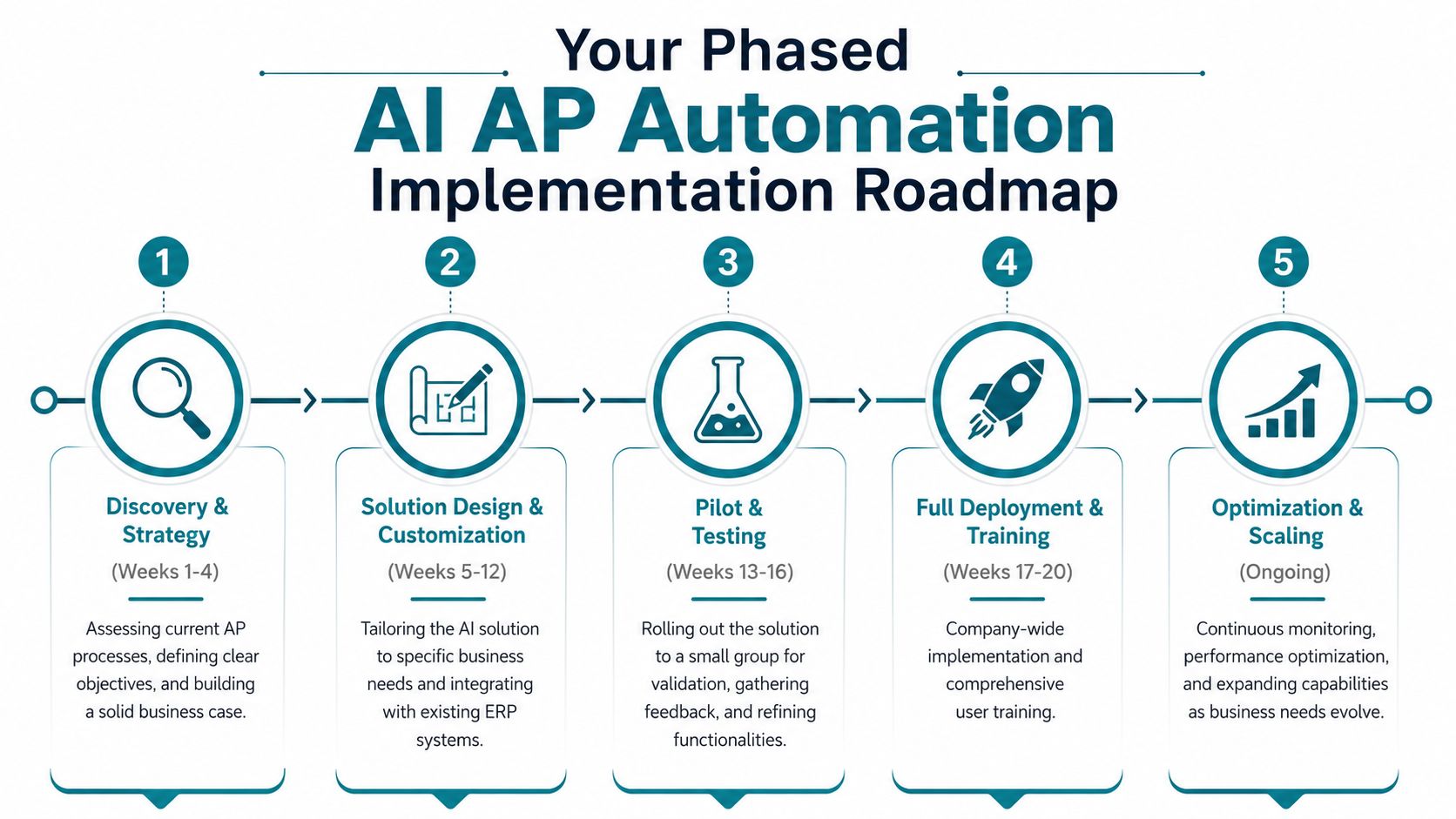
Most AP automation projects fail for one reason. The company tries to automate a messy process all at once. Good implementation is phased, controlled, and tied to a clear operating baseline. If the data is inconsistent and the approval logic is vague, the software won't rescue you.
Phase one, audit and strategy
Before any vendor conversation gets serious, map the AP process as it exists today. Not the intended workflow. The actual one. Where invoices arrive, who touches them, what gets rekeyed, what stalls, what gets paid late, and what lives outside the system.
This first phase should answer five practical questions:
- Data readiness: Are vendor records, PO data, GL coding, and approval rules clean enough for automation?
- Workflow scope: Which invoice types are stable enough to automate first?
- System environment: What ERP, accounting, procurement, and communication systems need integration?
- Control boundaries: Which approvals must remain human?
- Success metrics: Which KPIs will prove the pilot worked?
A phased AI adoption roadmap is useful here because the implementation challenge isn't only technical. It's operational. You are redesigning work, ownership, and controls.
Phase two, pilot with a narrow scope
The strongest pilots are boring on purpose. They don't try to automate every invoice type, every business unit, and every supplier on day one. They focus on a narrow slice where success is measurable.
Good pilot candidates include:
- A stable vendor group: Known suppliers with consistent invoice formats
- A single invoice class: For example, PO-backed invoices with standard approval logic
- A contained team: One region, one entity, or one finance subgroup
The point of the pilot is to validate more than extraction accuracy. You need to see whether the process works end to end. Does the system route invoices correctly? Do approvers use it? Are exceptions clear? Does the ERP sync hold up?
The pilot isn't a software test. It's a process test under real operating conditions.
Phase three, scale and optimize
Once the pilot is stable, scale in layers. Add more suppliers. Expand invoice types. Increase automation confidence thresholds only when review outcomes justify it. Keep a close eye on where exceptions rise as volume expands.
This phase usually involves three workstreams running together:
| Workstream | Focus | Common mistake |
|---|---|---|
| Operational rollout | Add teams, entities, and invoice categories | Expanding too fast before exception patterns are understood |
| Model refinement | Improve extraction, matching, and routing logic | Assuming early accuracy will hold without monitoring |
| Change management | Train users, redefine roles, and align approvals | Treating AP automation as an IT project only |
One practical note. This is also the stage where solution partners matter. Firms such as Tipalti, Medius, Basware, and AmasaTech can support implementation depending on your environment and scope. AmasaTech's model, for example, starts with an AI audit and phased rollout tied to measurable KPIs, which fits companies that need more strategy and integration support than a software-only deployment provides.
What scaling should feel like
A healthy rollout doesn't produce drama. AP handles more invoices with less manual touch. Approvers know where to act. Finance can see status without chasing updates. Exceptions become visible earlier and are easier to assign.
If the rollout creates confusion, hidden work, or new approval bottlenecks, stop expanding and fix the design before adding volume.
Choosing a Partner and Avoiding Common Pitfalls
The biggest buying mistake in AP automation isn't choosing the wrong software category. It's choosing a partner that can demo a polished workflow but can't survive your exceptions, your ERP constraints, or your control requirements.
What to compare side by side
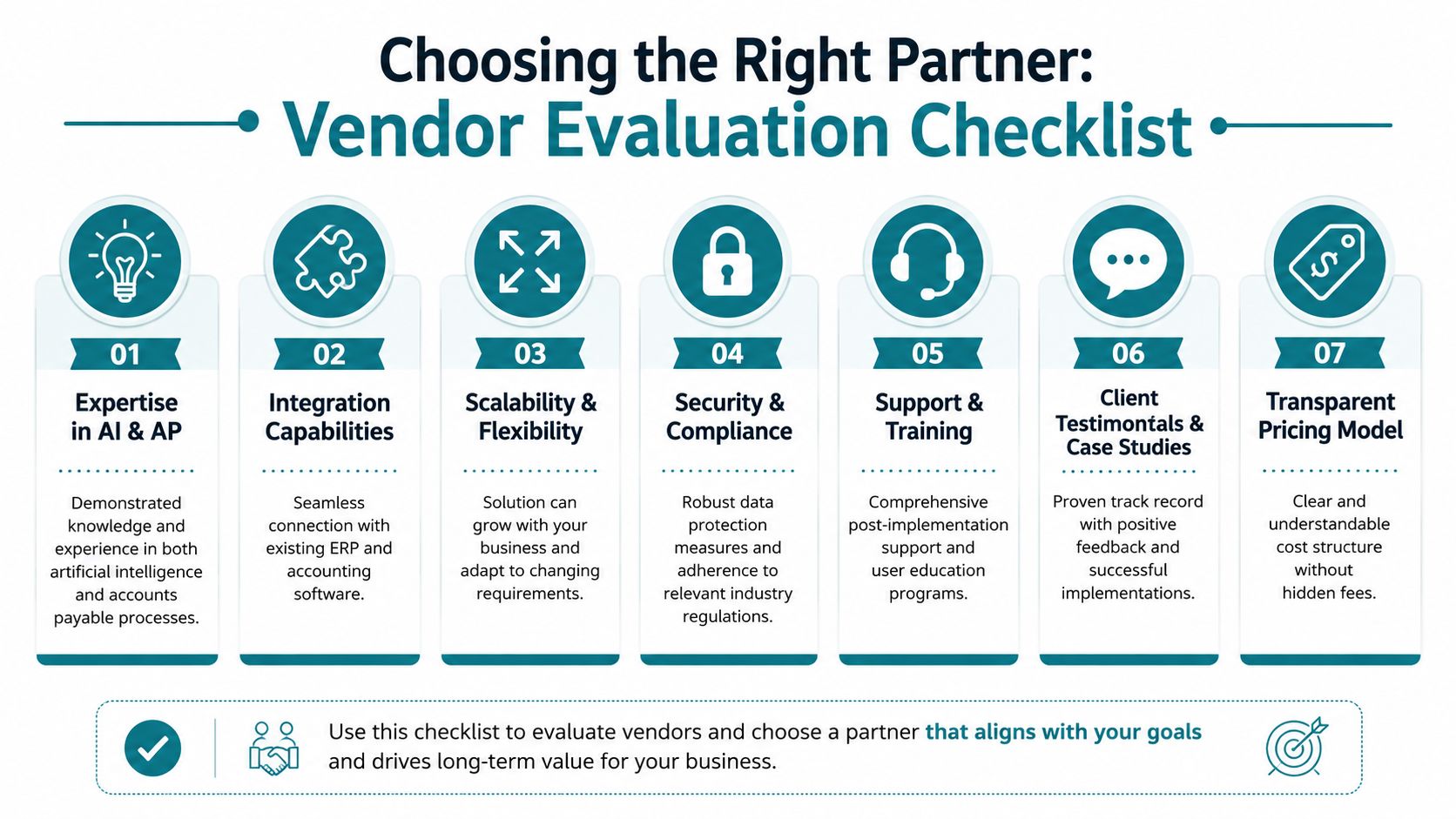
When evaluating vendors or implementation partners, use a practical checklist instead of feature marketing. A strong shortlist usually separates itself on execution details.
| Evaluation area | Strong signal | Red flag |
|---|---|---|
| Data capture quality | Handles header and line-item extraction across your real invoice formats | Looks good on sample invoices only |
| ERP integration | Clear method for syncing with your accounting stack | Requires heavy manual workarounds |
| Exception handling | Provides transparent workflows for mismatches and review ownership | Focuses mostly on straight-through processing demos |
| Approval logic | Supports policy-based routing with auditability | Treats approvals as an afterthought |
| Scalability | Can expand across entities, vendors, and invoice types without redesign | Needs custom rebuilds for every new use case |
| Security and controls | Clear governance, permissions, and review points | Vague answers on access and audit trail |
If you're choosing a build partner rather than only a software platform, this guide on selecting an AI development partner gives a useful lens for evaluating implementation depth, not just product fit.
The common failure points
Most AP automation projects run into the same problems.
- Dirty master data: Duplicate vendors, inconsistent naming, weak PO hygiene, and loose GL coding reduce model reliability.
- No change management: AP may adopt the tool while approvers stay in email, which recreates the bottleneck in a new place.
- Over-automation too early: Teams raise touchless thresholds before they trust exception handling.
- Tool-first planning: The company buys software before defining operating rules and business KPIs.
- Weak ownership: Nobody owns exception policy, vendor onboarding standards, or post-launch optimization.
The contrarian risk founders miss
AI can reduce duplicate payments and surface anomalies. It can also introduce a false sense of control if the fraud model is static.
Recent 2025 data shows that 22% of finance leaders report AI systems missing collusion-based fraud because the algorithms learn from historical patterns that don't include advanced, AI-enabled supplier fraud schemes, according to Rillion's discussion of AI in accounts payable.
That matters because AP fraud is changing shape. As systems get better at rule-based checks, bad actors adapt. They manipulate metadata, mimic legitimate invoice structure, and exploit the assumptions built into historical models.
Don't ask only whether a platform catches duplicates. Ask how it adapts when fraudulent invoices look more legitimate than the ones your team expects.
The practical response is straightforward. Keep human review for higher-risk scenarios. Monitor anomaly classes over time. Reassess fraud logic as supplier behavior changes. The goal isn't blind autonomy. It's controlled automation with active oversight.
Real-World Use Cases and Tangible ROI
The most useful AP use cases are the ones that remove repetitive work first, then improve control. You don't need a dramatic transformation story to justify the investment. You need a workflow that gets cleaner every month.
A growth-stage software company
A growing SaaS company often hits the same wall. Vendor count rises, non-PO invoices increase, and finance spends too much time coding expenses manually. In this setting, AI can suggest or automate GL account coding and route invoices to the right budget owner. The result is less manual classification work and a cleaner month-end review process.
That use case aligns with NetSuite's view that AI-powered AP automation with machine learning and natural language processing reduces labor costs by automating traditionally manual tasks such as three-way matching and GL account coding, while improving accuracy in payment processing and regulatory compliance, as described in NetSuite's guide to AI in accounts payable.
A mid-market manufacturer
Manufacturers usually get value faster from PO-backed workflows. When invoices, purchase orders, and receipts can be matched systematically, AP spends less time comparing documents and more time resolving genuine exceptions. Consequently, AI-supported three-way matching has a direct operational payoff. Teams stop reviewing every invoice as if it were unusual.
A multi-entity services business
Services businesses often struggle less with line-item purchasing complexity and more with fragmented approvals and vendor communication. In that environment, generative tools can support AP by summarizing invoice issues, answering user questions, and helping draft supplier responses. That doesn't replace the transactional engine. It improves the communication layer around it.
For teams exploring that side of the stack, this piece on generative AI for finance professionals is a practical starting point.
Strong AP automation doesn't make finance invisible. It makes finance faster at the work that still requires judgment.
The pattern across these examples is consistent. Start with stable, repetitive tasks like extraction, coding, matching, and routing. Keep humans on exceptions, policy, and fraud review. Measure the workflow with real KPIs. Scale only when the system earns trust.
If you're considering AI automation for accounts payable, AmasaTech can help assess whether your finance data, workflows, and systems are ready for automation before you commit to a rollout. That audit-first approach is often the difference between a pilot that produces measurable gains and a tool purchase that moves the mess into a new interface.