
Your AP team usually doesn't break all at once. It frays at the edges first.
A few more suppliers send PDFs in odd layouts. A customer-facing hire in finance starts spending mornings keying invoice numbers into NetSuite or QuickBooks instead of chasing approvals. Month-end close gets tense. Someone builds a workaround in Excel. Then growth turns a tolerable process into an expensive one.
That's the moment when invoice ocr ai stops being a nice-to-have and becomes an operating decision. Not because OCR is new, but because growth-stage companies can't afford to scale finance by adding review labor every time invoice volume rises. The fundamental question isn't whether automation works. It's how to choose the right architecture, how to measure success, and how to avoid buying a system that looks great in a demo but collapses under exception volume in production.
The End of Manual Invoice Processing
Manual AP processes often survive longer than they should because they fail without warning. The cost shows up as missed discounts, delayed approvals, supplier friction, and finance staff doing low-value reconciliation work instead of managing cash flow and controls.
For growth-stage companies, that hidden drag compounds fast. New entities, new vendors, and more invoice formats create enough variation that spreadsheet-driven workflows and basic template OCR start to crack. You can patch that for a while. You can't build a durable finance operation on it.
The market signal is hard to ignore. The Invoice OCR API market was valued at USD 2.11 billion in 2026 and is projected to reach USD 11.43 billion by 2035, growing at a 20.5% CAGR, according to Hyperbots' invoice OCR market overview. That projection matters less as a headline and more as an indicator that AI-driven document extraction has moved from fringe tooling to core finance infrastructure.
What changes when AI replaces manual capture
Traditional invoice entry is linear. A person receives the invoice, reads it, retypes it, checks the PO, fixes mismatches, and routes it onward.
Invoice ocr ai changes that operating model:
- Capture becomes immediate rather than waiting in an inbox or shared folder.
- Validation starts earlier before bad data reaches the ERP.
- Review shifts to exceptions instead of touching every document.
- AP capacity scales without adding headcount one-for-one with invoice volume.
Practical rule: If your finance team still touches nearly every invoice, you don't have automation. You have digital paperwork.
That's why many teams now treat AP automation as part of a broader operating model redesign, not just a back-office software purchase. If you're evaluating where invoice automation fits inside broader finance operations, this guide on AI accounts payable services is a useful companion.
How Invoice OCR AI Actually Works
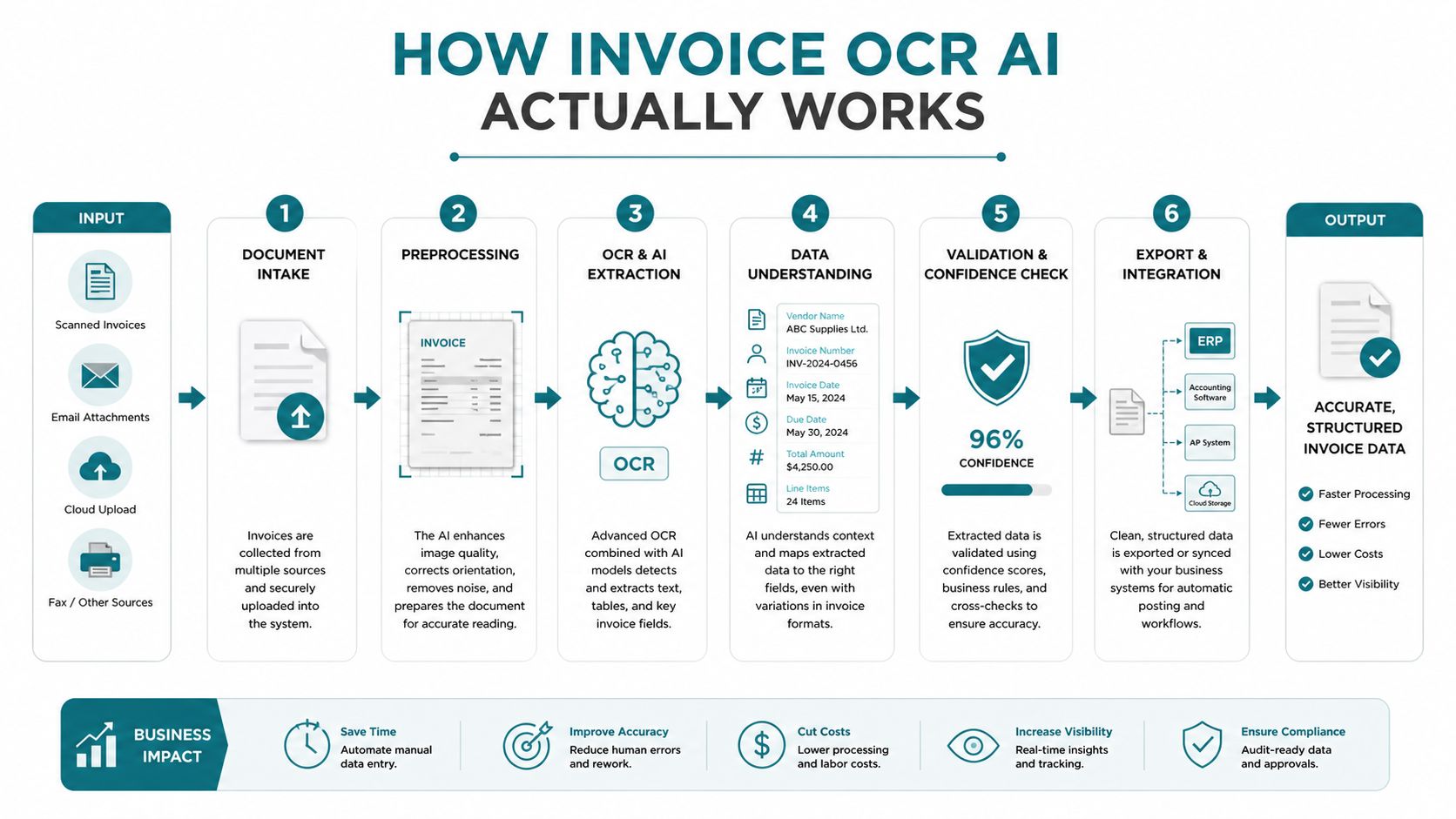
Many hear “AI OCR” and picture one model reading an invoice and outputting clean JSON. Production systems don't work that way. Good ones use a pipeline.
A practical way to think about it is a very fast finance analyst with several specialized assistants. One assistant looks at layout. Another reads text. Another identifies which text matters. Another checks whether the extracted data makes sense inside your business rules.
Step one sees the document before it reads it
Computer vision handles the first problem. An invoice isn't just text. It's a page with structure: header, vendor block, invoice number, line items, totals, tax fields, notes, stamps, and often a payment remittance section that shouldn't be treated as invoice content.
That layout step matters because the same number can mean different things depending on where it appears. A total near the bottom right isn't the same as a unit price inside a table. On multipage invoices, the system also has to connect line items across pages without losing row alignment.
Template-based OCR usually struggles in these scenarios. It expects fields in roughly predictable places. AI-based layout analysis handles more variation because it learns document structure rather than relying on fixed coordinates.
Step two turns pixels into text
This is the OCR layer in the classic sense. It converts scanned images, PDFs, email attachments, and photos into machine-readable text.
On digital PDFs, extraction is often simpler because the text already exists in machine-readable form. On scans, the system has to deal with skew, blur, low contrast, stamps, handwriting, and compression artifacts. That's why invoice quality still matters even in modern systems. Better input reduces downstream exceptions.
Step three identifies the fields that finance actually needs
Reading all text isn't enough. The system has to decide which text corresponds to:
- Vendor name
- Invoice number
- Invoice date
- PO number
- Subtotal, tax, and total
- Line items and quantities
- Payment terms
AI models such as deep neural networks and transformer-based extractors prove their worth. According to Gennai's invoice OCR explanation, AI-powered invoice OCR achieves 95-99% field-level accuracy by identifying fields without rigid templates, and that automation is tied to AP cycle times moving from 17.4 days in manual environments to 3.1 days in automated ones.
That sounds straightforward in a sales deck. In practice, line items are where many projects get exposed. Header fields are relatively manageable. Line-level extraction is where merged cells, inconsistent SKU naming, and table formatting can break weak systems.
Don't judge a vendor only on header extraction. Ask them to process invoices with messy tables, credit memos, and multipage line items. That's where real AP work happens.
Step four validates against business context
Raw extraction is not the finish line. A usable system checks whether the data belongs in your workflow.
That validation layer often compares extracted fields against:
- Vendor master data
- Approved purchase orders
- Existing invoice records
- Cost centers and GL coding rules
- Tolerance thresholds
- Duplicate invoice logic
Some teams describe the more advanced version of this as a RAG-style pattern, where the model uses approved business data as retrieval context before finalizing output or recommending next actions. Whether you call it RAG, validation orchestration, or document intelligence, the point is the same. AI shouldn't just read the invoice. It should read it in context.
That's also why standalone OCR APIs rarely solve the full AP problem by themselves. They extract. You still need orchestration, validation, workflow logic, and monitoring. Companies that want to understand that wider architecture usually benefit from looking beyond OCR and into document intelligence systems.
Step five routes confidence and exceptions differently
A production workflow doesn't treat every invoice the same. It routes based on confidence, business rules, and risk.
A common pattern looks like this:
- High-confidence standard invoices go straight into the ERP or approval queue.
- Invoices with validation mismatches pause for review.
- High-risk documents such as duplicates, inconsistent totals, or unclear supplier identity get escalated.
- Human corrections feed back into the system so operations teams can improve extraction rules and exception handling over time.
This distinction matters because invoice ocr ai isn't about removing humans from AP. It's about using human judgment where it matters, instead of wasting it on repetitive capture.
Measuring Success with the Right KPIs
Many invoice automation projects fail for a simple reason. The buyer tracks the vendor's favorite metric instead of the finance team's operating outcome.
Accuracy matters, but it's not enough. A system can look impressive in a demo and still leave your AP team buried in validation work because nobody defined success at the workflow level.

Start with throughput and unit economics
The strongest business case usually starts with the numbers that a CFO, controller, or operations lead already cares about.
According to ChatFin's 2026 enterprise benchmarks, manual invoice processing costs $15-25 per invoice and drops to $2-5 with AI, a 70-87% savings. The same benchmarks report processing time falling from 12-25 minutes to under 3 minutes, along with a 400% increase in invoices processed per FTE.
Those are not abstract efficiency stats. They change staffing plans, close processes, and the economics of growth.
The KPI stack that actually matters
For a growth-stage company, I'd focus on four core KPIs first.
Straight-through processing rate
This tells you what share of invoices move through the workflow without human intervention. It's the cleanest measure of whether automation is real or cosmetic.Cost per invoice
Use a fully loaded number. Include labor, review time, rework, and exception handling. If you ignore exception labor, your ROI model will look better than your operating reality.Cycle time from receipt to approval
Shorter cycle times improve AP responsiveness and reduce the chance that invoices sit unapproved because they're waiting for someone to type fields into the system.Invoices processed per AP team member
Scale is demonstrated by this. If invoice volume rises and throughput per person doesn't, the workflow still depends too much on manual effort.
Accuracy belongs inside a broader scorecard
Field-level accuracy is still useful, but it needs context.
A vendor can report high extraction accuracy while pushing too many invoices into manual review. Another can claim low touch rates by sending risky invoices downstream without enough validation. That's why a balanced scorecard should include operational and control metrics together.
A simple executive scorecard often works best:
| KPI | What it tells you |
|---|---|
| Straight-through processing | Whether automation is reducing human touch |
| Cost per invoice | Whether the business case is real |
| Approval cycle time | Whether AP is moving faster |
| Throughput per FTE | Whether staffing scales efficiently |
| Exception aging | Whether review queues are under control |
Operator's note: A project is healthy when finance leaders can explain its value without mentioning the model type. They should be able to talk about cost, speed, and control.
The mistake I see most often is teams buying invoice ocr ai to reduce data entry, then never redesigning approval workflows, exception routing, or duplicate checks. If the process around extraction stays broken, the KPI gains will stall.
Navigating Common Pitfalls and Challenges
The glossy version of invoice automation says that once you hit high accuracy, the problem is solved. That's not how production behaves.
The operational burden sits in the leftovers. The edge cases. The invoices nobody thought about during procurement. The AP analyst who now has to review a queue of “almost correct” documents.
Why 99 percent can still hurt
The most common misconception is that a high accuracy number automatically means low operational effort. It doesn't.
As Ken from Finance's analysis of invoice OCR accuracy puts it, the gap between 95% and 99% accuracy can mean the difference between reviewing 50 exceptions per month and 5. The same source notes that for a company processing 10,000 invoices monthly, even a 1% exception rate can cost $3,000–$5,000 per month in manual labor alone.
That's why exception design matters as much as extraction quality.
The problems that usually surface after go-live
A few failure modes show up repeatedly.
Poor input quality Blurry scans, crooked photos, partial pages, and compressed PDFs all reduce extraction reliability. Teams often blame the model when the intake process is the primary problem.
Weak exception routing
If every mismatch lands in one generic AP queue, review slows down and context gets lost. A tax mismatch, a duplicate risk, and a missing PO shouldn't all follow the same path.Unclear ownership
Automation still needs business owners. Someone has to decide what counts as an acceptable confidence threshold, who resolves supplier-level issues, and how corrections feed back into the workflow.Model drift and process drift Supplier formats change. Internal coding rules change. ERP fields get updated. A system that worked during pilot can degrade if nobody watches for performance shifts.
What works in practice
The strongest mitigation plans are usually operational, not magical.
First, separate invoices by risk class. Standard recurring invoices, PO-backed invoices, service invoices with complex line items, and low-quality scans shouldn't all be evaluated the same way.
Second, design a human-in-the-loop review process that's intentional:
- Route duplicate risk to controls owners
- Send PO mismatches to procurement or receiving
- Push coding ambiguities to finance
- Return unreadable documents to intake or vendor management
Third, create a review screen that shows why the invoice was flagged. Analysts move faster when they can see the extracted data, the source region, and the failed validation in one place.
High-performing AP teams don't aim for “no humans.” They aim for “no wasted human effort.”
Finally, expect change management to be real. AP staff won't trust a new system because a vendor promised accuracy. They trust it when the exception queue is manageable, the errors are understandable, and corrections stick.
The Build vs Buy Decision Framework
Most growth-stage companies shouldn't begin with “Can we build this?” They should begin with “What exactly are we trying to own?”
Invoice automation includes document ingestion, OCR, field extraction, validation, exception routing, ERP integration, monitoring, and support. Building one piece isn't the same as owning the full lifecycle.
Build when the workflow is the product
A custom build makes sense when invoice handling is tightly linked to your competitive differentiation or risk model. That's more common in fintech, insurance, marketplace operations, or embedded finance products than in a standard internal AP function.
If your documents are unusual, your workflow is highly specialized, or your controls need custom orchestration that SaaS tools can't support cleanly, building can be justified. But the hidden cost is rarely the first model. It's ongoing maintenance.
Buy when speed and operating leverage matter most
A SaaS product usually wins when you need value quickly, your invoice patterns are common enough, and your team doesn't want to maintain extraction models and workflow infrastructure internally.
For many growth companies, buying gets you into production faster and lets your internal team focus on approvals, controls, and finance process redesign instead of vision model tuning and document ops.
Here's a simple framework.
| Criteria | Build (Custom Solution) | Buy (SaaS Vendor) |
|---|---|---|
| Speed to value | Slower. You need design, data pipelines, validation logic, and testing before go-live. | Faster. Core extraction and workflow features are already packaged. |
| Upfront control | Highest control over models, business rules, and UI. | Control depends on product flexibility and API access. |
| Maintenance burden | Your team owns drift, uptime, retraining, support, and integration changes. | Vendor handles much of the core platform maintenance. |
| Customization depth | Best for unusual invoice types, bespoke approval logic, or regulated flows. | Good for standard AP patterns, weaker for highly specific edge cases unless extensible. |
| Total cost predictability | Harder to forecast because engineering and ops costs continue after launch. | Easier to budget if pricing aligns with your volume and exception profile. |
| Scalability responsibility | You scale infrastructure and support model performance yourself. | Vendor usually scales core infrastructure, though integration complexity still sits with you. |
| Strategic differentiation | Useful if invoice intelligence is part of your product or moat. | Better if invoice processing is operational plumbing, not a differentiator. |
The decision questions that matter
Instead of asking for a generic pros-and-cons list, ask these:
- Is invoice processing core to our differentiation, or is it a supporting operation?
- Do we have internal AI, data, and platform talent that can own this beyond launch?
- How unusual are our invoices and approval rules?
- Do we need deep model control, or mainly dependable business outcomes?
- Can we tolerate a longer path to production?
- What happens when the first version needs monitoring, tuning, and support?
A lot of teams underestimate the last question. The first launch is the easy part. The harder part is keeping extraction stable while vendors change layouts, the ERP evolves, and finance asks for new controls.
A practical default for growth companies
For most growth-stage operators, the best path is often buy first, customize selectively. Use a vendor or packaged platform to handle commodity capabilities such as OCR, base extraction, and standard connectors. Then build your own workflow logic, validations, or review tooling only where it creates clear business value.
That approach shortens time to value without locking you into one-size-fits-all operations.
If you're pricing options, don't stop at license cost. Model review labor, integration work, support ownership, and upgrade effort often matter more than the headline subscription. This broader lens is why many teams benefit from reviewing AI automation services pricing models before deciding.
Deploying and Integrating Your Solution
An invoice OCR AI system only creates value when the output lands cleanly inside the systems your team already uses. Integration is where many projects either become part of daily operations or turn into another side tool that finance has to babysit.
The right pattern depends less on vendor marketing and more on your stack, your internal engineering capacity, and how much control you need over validation and workflow.
API integration for teams that want flexibility
API-based integration is the strongest option when you have product or engineering support and want to control workflow logic.
The usual pattern looks like this: invoices arrive by email, upload portal, or document feed. Your service sends the file to the extraction engine. The result comes back as structured data. Then your own logic validates fields, applies routing rules, and pushes approved records into NetSuite, SAP, QuickBooks, or your internal finance layer.
API-first setups work best when:
- You have multiple intake channels
- You want custom validation rules
- You need to orchestrate approvals outside a vendor UI
- You care about portability and long-term architecture
The trade-off is obvious. You own more of the implementation work.
RPA wrappers for older systems
Sometimes the ERP or accounting system has weak APIs, no modern integration layer, or a brittle workflow that nobody wants to touch yet. In those cases, RPA can bridge the gap.
A bot can take extracted invoice data and mimic human actions in a legacy interface. It's rarely elegant, but it can be effective as an interim step when replacing the core finance system isn't realistic.
RPA-wrapped approaches fit when:
- The system of record can't accept clean API pushes
- The business needs automation soon
- A modernization project is already planned but not finished
The downside is maintenance. UI changes can break automations, and debugging bot behavior is rarely pleasant.
Use RPA as a bridge, not as your long-term architecture, unless you're comfortable owning brittle automations.
Native ERP connectors for faster rollout
Some invoice platforms offer direct connectors into common finance systems. This is the simplest path for many teams because the vendor has already solved common mapping and authentication patterns.
Native connectors are a good fit when your process is fairly standard and speed matters more than custom orchestration. They can be especially useful during a pilot because they reduce engineering dependence.
Still, ask hard questions before you commit:
- What happens when an invoice fails validation?
- Can you customize field mapping and approval paths?
- How are duplicates handled?
- What data and logs can you export?
- What breaks if you switch ERPs later?
If you're evaluating these patterns at the architecture level, this overview of API architecture for AI systems helps frame the trade-offs clearly.
A Phased Adoption Roadmap for Growth Companies
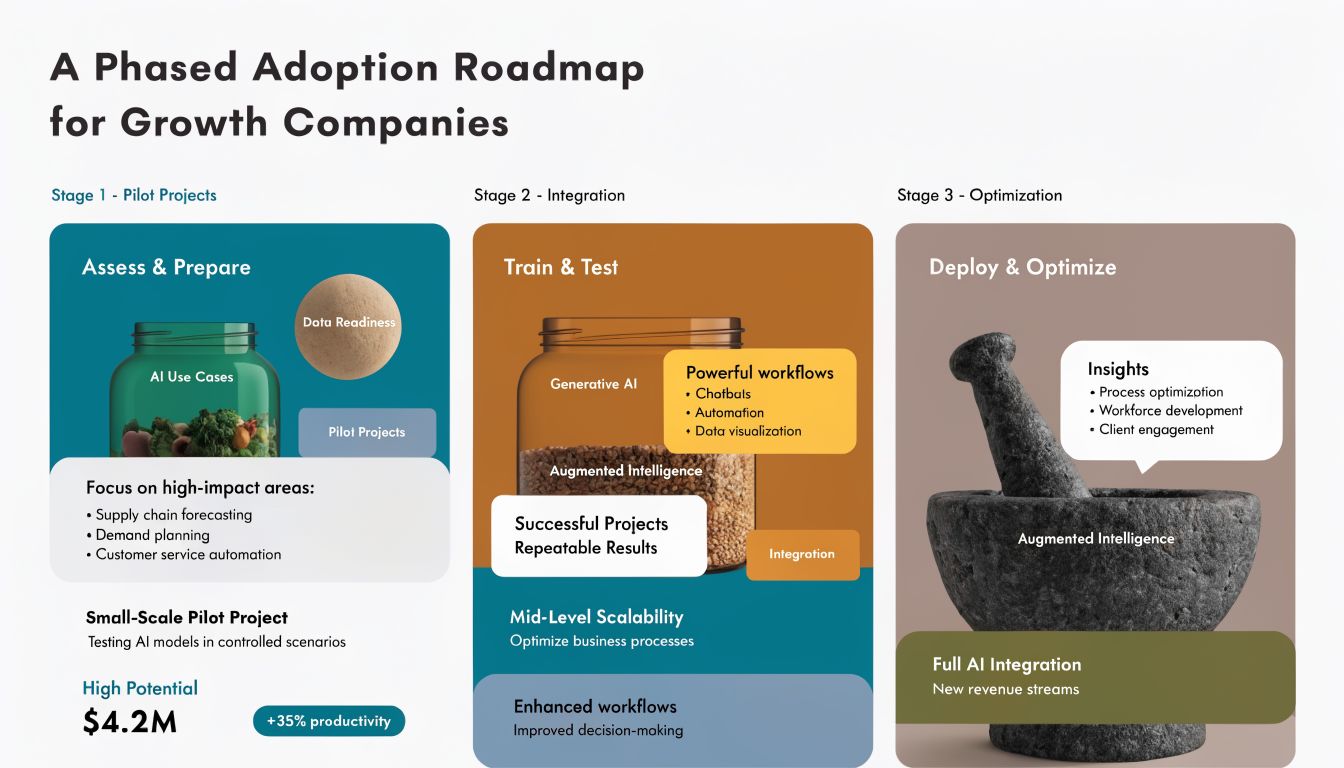
The fastest way to derail invoice automation is to treat it like a big-bang transformation. Growth companies usually win by sequencing the work.
You don't need every invoice type, every entity, and every approval path automated on day one. You need an adoption path that proves value, protects controls, and gives finance enough confidence to expand.
Phase one proves the workflow
Start with a bounded use case. Pick one invoice class that has enough volume to matter and enough consistency to show early gains.
Good pilot candidates usually include recurring vendor invoices or PO-backed invoices with predictable fields. Avoid the noisiest invoice types at the start. The point is to validate intake, extraction, validation, review, and ERP posting with minimal organizational friction.
During the pilot, focus on questions like:
- Which invoices can move straight through?
- Why do exceptions occur?
- Which validations create value and which create noise?
- How quickly can AP reviewers resolve flagged invoices?
Success in this phase is operational confidence, not maximum coverage.
Phase two expands coverage and hardens controls
Once the pilot is stable, add complexity deliberately. Bring in more suppliers, more invoice layouts, and more exception types.
This is usually the phase where teams refine routing and ownership. Procurement handles one mismatch type. Finance handles another. Duplicate checks get tighter. Audit logging becomes more important because the system is now part of a real financial process, not a controlled experiment.
A few practices matter here:
- Review exception categories monthly
- Retire low-value manual checks
- Track recurring supplier formatting issues
- Tighten integrations so re-entry disappears
- Document fallback procedures for finance teams
Phase three optimizes for operating leverage
Once the process is stable, optimization becomes less about OCR and more about orchestration.
The team can start using accumulated invoice data to improve coding suggestions, prioritize urgent approvals, detect unusual patterns, and reduce review friction further. This is also the stage where many companies revisit their original build-versus-buy assumptions. Some stay with a packaged approach. Others add custom layers around a commercial core.
Mature AP automation doesn't feel like “AI.” It feels like a process that rarely stalls and a review queue that stays under control.
The next wave is autonomous exception handling
Extraction is no longer the frontier. Decision support is.
According to Medius' discussion of agentic AI in invoice processing, the next evolution is “Agentic AI,” which can “autonomously adjust to new invoice formats” and “autonomously detect inconsistencies, suggest corrections, and optimize invoice routing.”
That doesn't mean finance should hand over approvals blindly. It means the system can move from reading documents to helping resolve routine exceptions with context and suggested actions. For growth companies, that's the strategic arc: first eliminate manual capture, then reduce manual judgment on low-risk cases, then reserve people for the decisions that require judgment.
A phased rollout is what makes that future practical. Teams that want a structured path from early pilot to scaled adoption usually benefit from a broader AI adoption roadmap that aligns data readiness, workflow redesign, and KPI ownership.
If you're evaluating invoice OCR AI and want a partner that ties deployment to measurable business outcomes, AmasaTech helps teams move from AI audit to production rollout with KPI-driven execution across document intelligence, workflow automation, and ongoing optimization.