
You're staring at a stack of cameras, a thin operations team, and a backlog of incidents that still have to be reconstructed by hand. The vendor deck is full of promises about “smart” alerts and cloud AI, but your actual question is simpler, what will cut response time, reduce noise, and not create a compliance mess you'll regret later?
Video Surveillance AI is no longer a gadget decision. It's a workflow decision, and the wrong architecture turns video into expensive clutter instead of evidence, automation, or a defensible record. The market has already crossed from niche security into a multi-billion-dollar software and hardware category, with independent estimates putting it at USD 6.51 billion in 2024 and projecting USD 28.76 billion by 2030 in one forecast, while other trackers still show multi-billion-dollar growth through the decade Grand View Research.
Why Video Surveillance AI Is Now a Workflow Decision
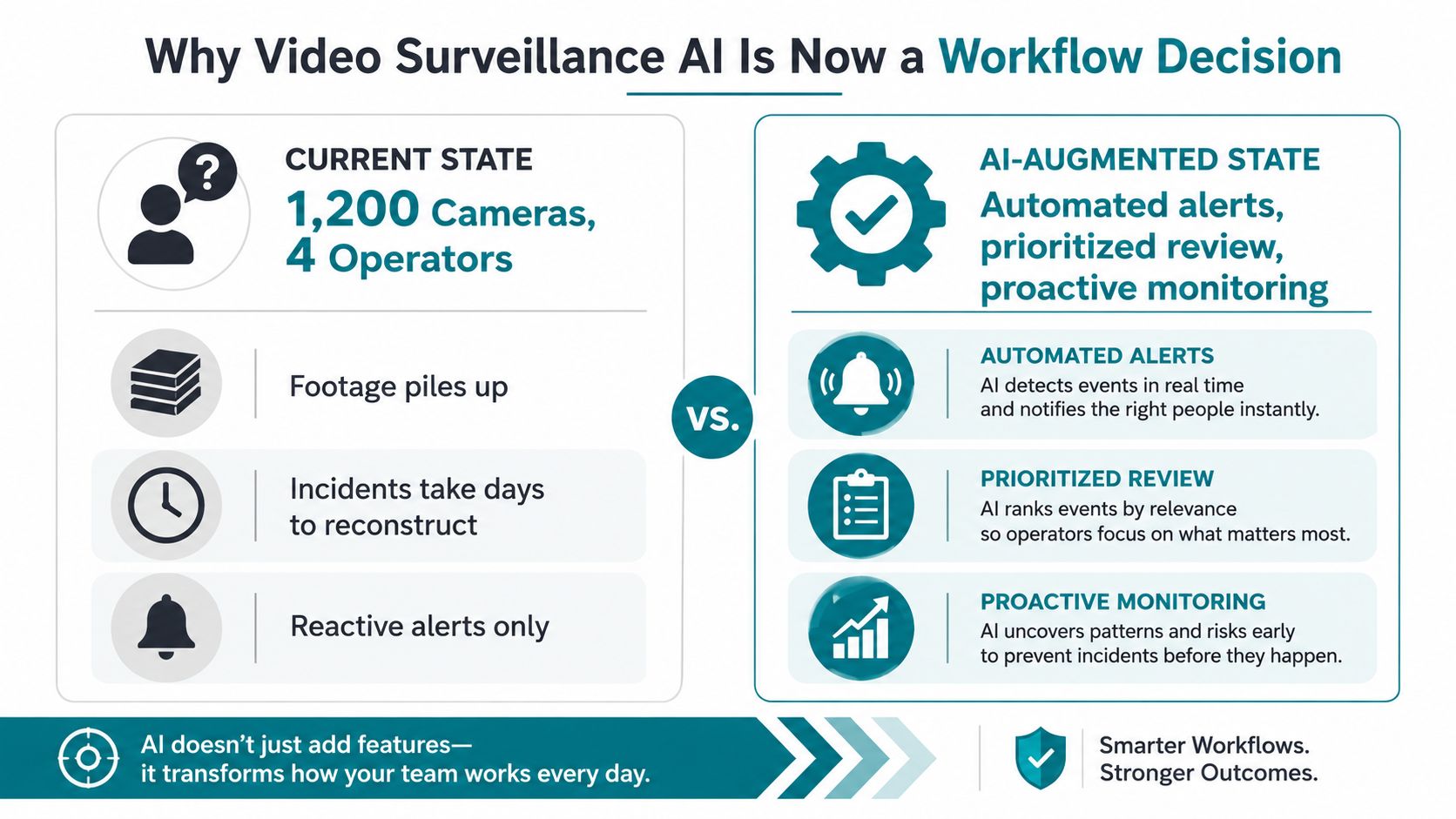
A security lead at a mid-sized logistics firm knows the pain. There are 1,200 cameras across six yards, four operators on shift, and every incident still becomes a forensic project instead of a live alert. By the time someone reconstructs the sequence, the cost is already locked in.
The core bottleneck is operator attention. Traditional motion alerts flood screens with noise, leading staff to stop trusting them. If a system fires on every shadow, tail light, or passing forklift, it stops being a security tool and turns into a nuisance generator.
The shift is from recording to routing
Video Surveillance AI changes the job of surveillance software. It detects events, triages them, and routes the right alert to the right person. That is the part that changes operations.
Practical rule: If an alert does not reach a named owner with a clear next action, it is not automation. It is just louder monitoring.
A 2025 global industry survey from Axis Communications reported that AI adoption was more advanced in the US, Japan, Singapore, and parts of Europe, with customers asking for better surveillance capability and operational efficiency. The same source said 48.1% of respondents had deployed AI video solutions in at least 25% of their projects, and close to 15% said AI was part of most deployments Axis Communications.
What executives should answer before they pilot
Start with the workflow, not the camera count. Pick incidents that cost time, money, or compliance risk. Then assign ownership for alerts before the system goes live, because an unowned alert dies in the queue.
Define success with operational metrics. Measure response time, false-alert rate, and how often an alert leads to an action. For edge versus cloud trade-offs, benchmark latency, bandwidth use, and retention requirements before you commit to an architecture. If the vendor cannot show those numbers in your environment, the pitch is ahead of the deployment.
If you cannot name the workflow, the owner, and the KPI, you are not ready to buy. You are ready to waste budget.
The Core Technologies Inside Modern Video Surveillance AI
Think of the stack as a brain with eyes, memory, and judgment. The eyes spot objects, the memory follows them across frames, and the judgment decides when something deserves attention. If one layer is weak, the whole system still feels clumsy in production.
Object detection gives the system its eyes
Object detection is the base layer. It identifies people, vehicles, packages, helmets, and other defined targets, then draws bounding boxes and confidence scores around them. In practical deployments, that's the difference between “motion happened” and “a person entered the loading dock after hours.”
The model family matters less than the outcome, but modern teams usually benchmark against YOLO-family detectors and transformer-based detectors because they're common baselines for speed and accuracy. If a vendor won't tell you what class of detector it uses, or how it performs in your lighting conditions, assume the demo is doing too much hand-holding.
For a practical reference point on deployment-oriented detection workflows, see AmasaTech's video object detection solution. The important takeaway isn't the brand name, it's that detection must map to a real business event.
Tracking turns snapshots into continuity
Tracking is the memory layer. It keeps a persistent ID on the same person or vehicle across multiple frames, which is what lets teams measure dwell, route movement, and repeated appearances. Without tracking, every clip looks like a disconnected series of screenshots.
Common baselines include SORT, DeepSORT, and ByteTrack. Those names matter because they support a basic operational truth, if you can't track reliably, you can't count reliably. And if you can't count reliably, your KPI dashboard becomes a guessing game.
Don't let anyone present a single-frame demo as a finished surveillance product. A real system has to remember what it saw five seconds ago.
Anomaly detection is where the judgment starts
Anomaly detection is what flags loitering, line-crossing, crowd surges, and unattended objects without forcing you to encode every rule by hand. That's the layer buyers care about when they say they want “smarter alerts,” but it only works if the detection and tracking layers are already solid.
The architecture decision comes next. A modern system usually runs inference on the edge or a local gateway, while model training, versioning, and cross-site reporting live in the cloud. That split is not a trend, it's a deployment necessity when you need speed without turning the network into a bottleneck.
Edge, Cloud, and Hybrid Architecture Trade-offs
Stop treating architecture as a vendor checkbox. Decide where inference lives by asking what happens when a truck backs into a gate, someone crosses a restricted zone, or a camera drops offline for a few seconds. The right design is the one that meets your response time, bandwidth, and compliance constraints without forcing you to overbuild.
Edge wins when time and privacy matter
Edge processing keeps video close to the camera, which cuts latency and reduces network load. That matters in transportation, healthcare, and public safety, where the system has to detect and act within seconds Frontiers in Imaging. It also fits sites with uneven connectivity or a privacy stance that keeps raw video on premises.
Use edge for warehouses, retail back rooms, and perimeter zones. It is the safer default when alerts must keep working even if the WAN gets flaky.
Cloud is for aggregation, retraining, and oversight
Cloud architectures make sense when you need heavy retraining, cross-camera analytics, or centralized operations across multiple sites. They also help when your team needs shared dashboards and model governance across locations. That does not make cloud the right place for first response.
Cloud-only designs usually pay a latency penalty and a bandwidth tax. A benchmarked hybrid pipeline reported median latency falling from 460 ms to 130 ms, uplink bandwidth dropping from 5.2 Mbps to 0.3 Mbps, and accuracy staying close, with mAP@0.5 of 0.86 cloud-only vs 0.83 hybrid Academic Publishers. Use that pattern as the baseline: edge for first-pass inference, cloud for consolidation, audit, and cross-site reporting.
Use a simple decision rubric
- Privacy-sensitive sites: start with edge.
- Low-latency alerts: use edge or hybrid.
- Strong fiber and centralized operations: cloud can work for aggregation.
- Multi-camera sites with tight response budgets: hybrid is usually the safest default.
For a deployment-oriented checklist on site constraints, bandwidth, and model placement, see AmasaTech's edge AI deployment guide. Choose the architecture that matches your KPI targets and compliance posture, not the one that looks neat in a slide deck.
Real Use Cases and KPIs by Industry
The mistake is asking whether video surveillance AI "improves security." That question is too vague to fund or govern. You need a KPI that a founder, operator, and finance lead can all read the same way.
Retail
Retail teams should focus on shrink signals, queue wait time, and dwell patterns. The baseline is usually inconsistent, because human observation misses too many events, especially during peak hours. After six months, the goal isn't magic, it's cleaner exception handling and fewer missed incidents.
The data sources are straightforward, POS logs, camera analytics, and store incident records. Watch out for vendors bragging about “alarm reduction” in retail without proving that the system still catches meaningful events. That metric can be gamed by suppressing alerts instead of improving judgment.
Manufacturing
On the plant floor, track PPE compliance adherence, near-miss frequency, and line-stoppage prevention. The baseline is often manual spot checks, which don't scale and don't give you a reliable trend line. The target after six months should be better visibility into recurring hazard zones, not just more video clips.
Tie the KPI to events per shift, incidents per line, and time-to-review. If a vendor can't show how they separate routine movement from actual safety risk, the demo is cosmetic.
Logistics and warehousing
Use load-dock dwell time, forklift proximity events, and yard throughput. The baseline here is usually reactive dispatch and after-the-fact investigation. A strong deployment reduces wasted time by surfacing the exact bottlenecks, not by claiming the whole yard is “smarter.”
Healthcare, education, and municipal sites
Healthcare teams care about patient elopement alerts, restricted-area breaches, and fall detection latency. Schools watch campus entry flow, after-hours occupancy, and vehicle anomaly flags. Municipal deployments usually care about incident-to-response time and traffic classification accuracy, because the value lives in triage speed and better dispatch.
Operational rule: Pick one primary KPI and two supporting KPIs per site. More than that, and your dashboard turns into a political document.
The data inputs should be boring, camera metadata, access logs, incident reports, and response timestamps. That's good. Boring is what keeps the measurement honest.
Data, Model, and Infrastructure Readiness Checklist
A lot of surveillance AI failures have nothing to do with the model. They come from bad camera coverage, broken retention, weak labeling discipline, or an infrastructure stack that can't support the workload. Treat readiness as an audit, not a vibes check.
Score the system before you scale it
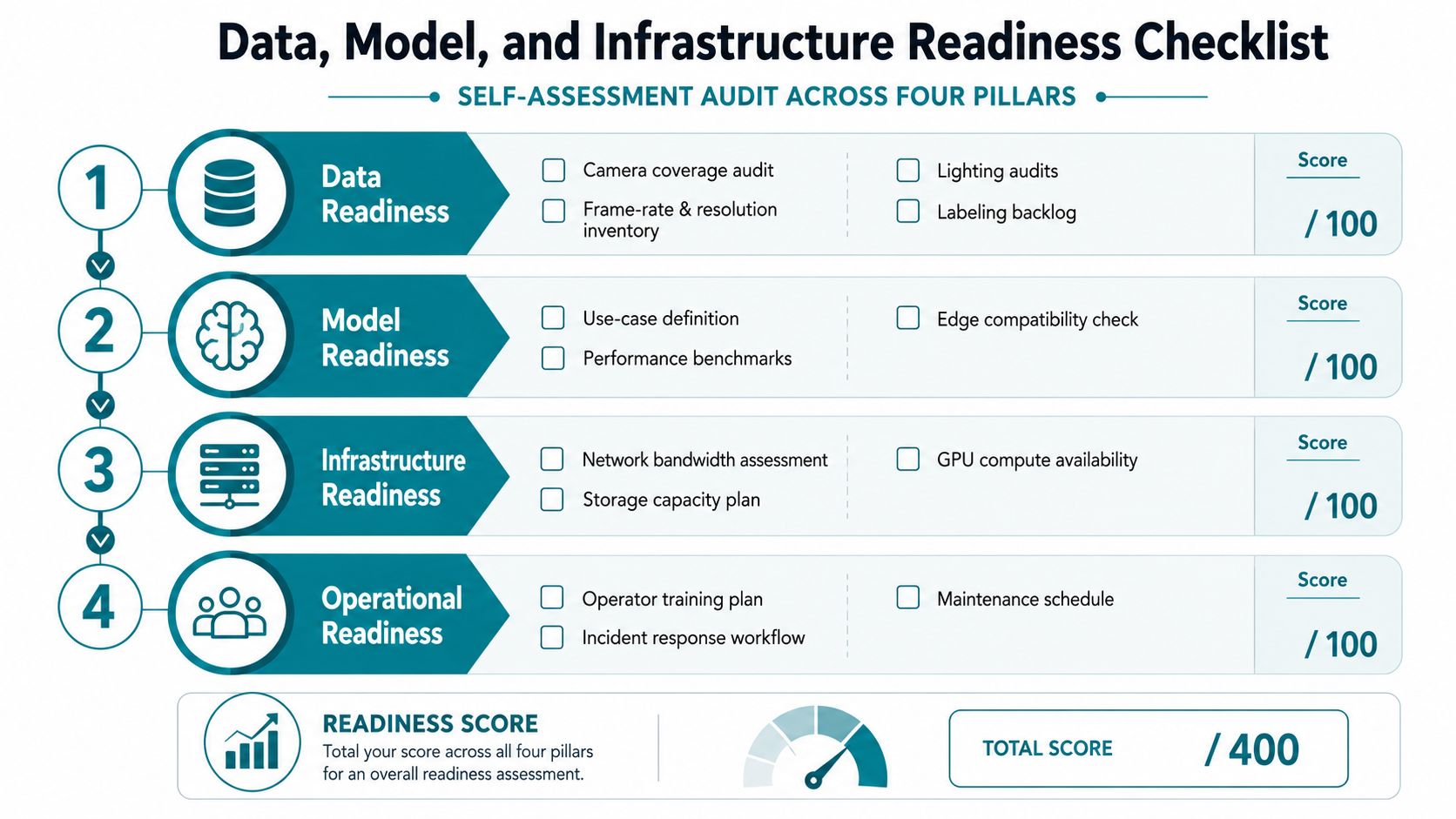
Use a pass/fail checklist across four pillars.
-
Data readiness
- Camera coverage audit
- Frame-rate and resolution inventory
- Lighting audit by zone
- Labeling backlog defined
- Historical footage retention confirmed
-
Model readiness
- Use case defined in one sentence
- Baseline benchmark set
- Edge compatibility checked
- Version control in place
- Regression test set separated from training data
-
Infrastructure readiness
- Network bandwidth by site documented
- NVR or VMS upgrade path identified
- Edge device capacity understood
- GPU pool size set for training
- Storage growth modeled
-
Operational readiness
- Operator training plan written
- Incident response workflow assigned
- Maintenance schedule approved
- Access controls reviewed
- Audit logging enabled
Use a weighted score, not a binary yes
Not every failed item should block the pilot. Weight the pillars by operational risk, then convert the total into a readiness percentage. If governance and data are weak, the score should drop faster than if a single edge appliance is undersized.
The biggest warning sign is simple. If you don't have under three months of clean labeled data, you're not ready to expand outside a pilot. A messy pilot is fine. A messy rollout is how teams burn trust.
For a practical audit format, AmasaTech's AI readiness checklist fits the way buyers evaluate these projects. Assign each gap to one owner, then fix the highest-risk gaps first, not the easiest ones.
A Practical Cost and ROI Framework
A serious business case starts with line items, not templates. If someone hands you a slide that says “video AI saves time,” send it back. Finance needs a model that names the cost buckets and the benefit buckets separately.
Build the spend model the way ops will feel it
Capex usually includes cameras, edge appliances, server or GPU clusters, VMS upgrades, and integration middleware. Opex includes model retraining cycles, cloud egress, storage retention, labeling services, and SOC analyst augmentation. If you're not naming these items up front, the final invoice will do it for you.
The value side should be grouped into three families. First is labor redeployment, meaning hours reclaimed per shift. Second is loss prevention, such as shrink delta or incident cost. Third is operational efficiency, including throughput, dwell time, and energy savings where relevant.
Use a payback formula the board can follow
A defensible formula is simple.
Payback period = total deployment cost divided by annualized benefit
That's not fancy, but it keeps the conversation honest. Build a 12-month conservative case using only benefits you can defend from current operations, then a 36-month upside case that includes broader scale benefits and more sites. The assumptions that move the result most are camera count, bandwidth cost, labeling effort, and how much analyst time the system saves.
Financial rule: If the ROI only works when every vendor promise is true, the ROI doesn't work.
Vendors love inflating false-positive reduction and analyst productivity claims. Those are the easiest metrics to cherry-pick because the baseline is often sloppy. Your scoring sheet should force the buyer and the security lead to agree on how each metric gets measured before procurement starts.
If you want a calculator-style starting point, AmasaTech's AI ROI calculator is the right kind of tool to structure the assumptions. One more hard rule, if a site is too small to support local inference, don't force it. Use a lighter deployment pattern instead of buying hardware you can't justify.
Privacy, Compliance, and Security Foundations
Treat privacy and security as deployment prerequisites, not cleanup items. If your legal team sees the system as an afterthought, the project will stall later, usually after someone asks where the footage is stored, who can query it, and how long it stays there.
Lock governance before launch
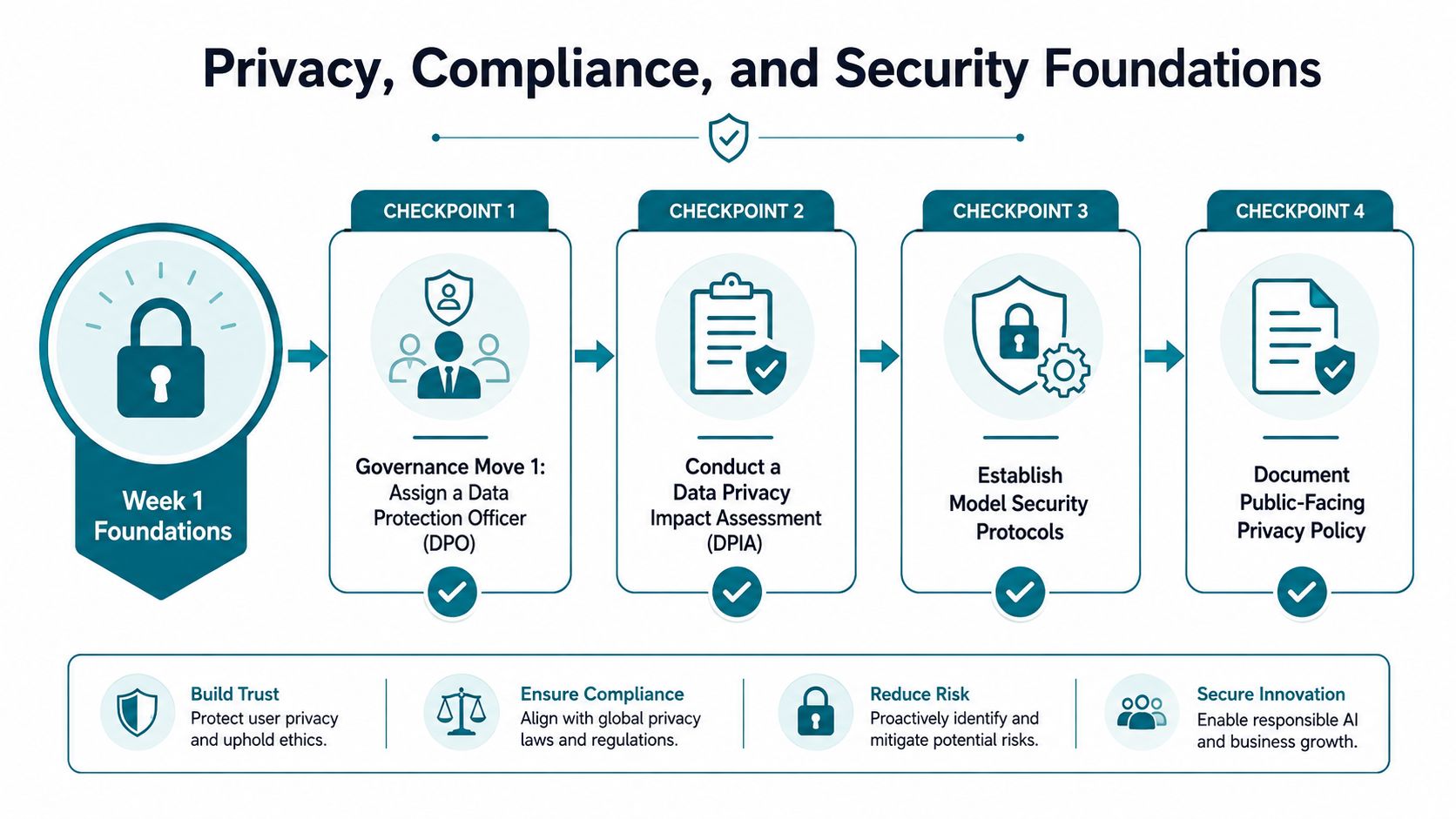
Week one should include a named data controller, a camera-to-regulation map, and a DPIA template built for computer vision. That matters because camera zones often carry different risk profiles, especially when public-facing areas, employee entrances, or biometric-like processing are involved. You should also set retention windows with automated deletion instead of relying on manual cleanup.
Regulatory fit gets real when you map your deployment against GDPR, CCPA, BIPA, and the EU AI Act high-risk classification before you roll out broadly. If you need a deployment reference for security controls, AmasaTech's AI security best practices is a useful place to anchor your internal review.
Put technical controls at the edge
Use face and license-plate blurring where appropriate, role-based access for every operator tier, and audit logs for each model query. If the system can't prove who accessed what and why, it's not ready for serious environments.
Also test for adversarial risks. Camera firmware can be attacked through weak patching practices, and vision systems can be stressed by tampering, occlusion, or bad model assumptions. Schedule bias audits, document lawful basis per camera zone, and keep a runbook for model drift or exposed endpoints.
If your compliance story can't be summarized on one page for legal review, the deployment isn't production-ready. That's the standard. Anything looser means you're hoping no one asks hard questions.
Phased Playbook From Quick Wins to Long-Term Scale
The fastest way to kill a surveillance AI program is to start too big. The right rollout proves value early, locks the operating model, then expands once the team trusts the alerts and the data.
Phase 1, validate the signal
Use two existing cameras and validate alert accuracy against a human baseline. The sponsor should be the security or operations lead, with a small pilot budget and a clear exit criterion, which is simple, does the system reduce false positives enough to justify the next step? The KPI is alert precision, not bragging rights.
Phase 2, standardize the stack
Pick one edge appliance vendor, build a labeled dataset of site-specific incidents, and integrate alerts into the current VMS or SOAR. The sponsor shifts to the person who owns security systems or site technology, because this stage is about reliability, not novelty. The KPI should be response consistency and workflow adoption.
Phase 3, expand to multiple sites
Roll out to ten sites, add anomaly detection for safety and operational use cases, and stand up a monitoring dashboard for precision, recall, and drift. The sponsor should include an operations executive, because this phase starts affecting business rhythm. The KPI is whether the system remains useful as the environment changes.
Phase 4, scale with discipline
Move to a hybrid edge-cloud architecture, add custom models for the top three business problems, and run quarterly red-team exercises. The sponsor needs to be someone who can defend the program in budget reviews and risk meetings. The KPI is sustained performance across sites, not a one-time demo win.
The best programs don't chase every new feature. They lock the workflow, then earn the right to expand.
If you're planning the next two quarters, start with a pilot that proves one workflow, one owner, and one measurable outcome. AmasaTech works on AI audits, computer vision deployments, and KPI-tied rollouts for teams that want video surveillance AI to produce operational results instead of slideware. Visit AmasaTech if you want a practical deployment plan built around your cameras, your risks, and your budget.